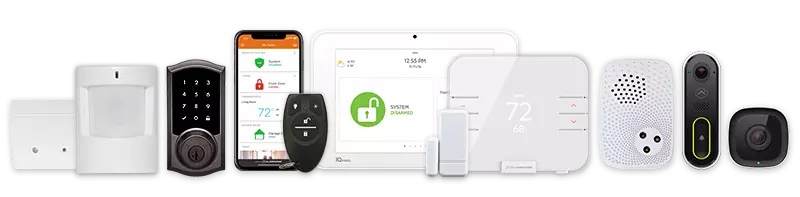
Most business owners think about security after something goes wrong. A break-in, a stolen laptop, an unauthorized visitor wandering through the building – these moments tend to be the wake-up call. But the smarter approach is to get ahead of the risk before it becomes a real problem.
That is exactly what an office building security checklist is designed to do. It gives you a structured way to evaluate your property, identify weak points, and take action before a vulnerability turns into a loss.
Whether you manage a single-floor office or a multi-story commercial property building, this guide walks you through the key areas your security plan needs to cover.
Why a Security Checklist Matters More Than You Think
Security is not a one-time setup. It is an ongoing process that requires regular inspection, honest risk assessment, and a willingness to update your approach as threats evolve.
A office building security checklist removes the guesswork. Instead of relying on memory or gut feeling, you have a repeatable system for reviewing every layer of your physical security – from the perimeter of your building all the way to how information is handled inside.
Think of it as a security audit you can run on a schedule, not just when something feels off.
Start With a Perimeter Assessment
Evaluate Your Building’s Outer Defenses
Your perimeter is the first line of defense, and it is often the most overlooked. Walk the exterior of your property and ask yourself whether someone could approach the building undetected, find an unlocked entry point, or access areas that should be restricted.
Look at your lighting. Poor lighting around entrances, parking areas, and loading docks creates blind spots that raise your risk significantly. Good perimeter lighting is one of the simplest and most effective deterrents against theft and unauthorized access in an office building security checklist.
Check your fencing, gates, and landscaping too. Overgrown shrubs near entry points can provide cover for anyone with bad intentions – keep those areas clear and visible.
Access Control: Who Gets In and Who Does Not
Upgrade Beyond Lock and Key
Traditional lock-and-key systems still have their place, but they are no longer enough on their own for most commercial properties. If a key gets copied or an employee leaves without returning theirs, you have a real vulnerability on your hands.
Modern access control systems use key cards, PINs, biometric readers, or mobile credentials to manage entry at every door. These systems give you a clear log of who entered and when, which is incredibly useful during an incident review or information security audit.
Visitor Management and Internal Zones
Not everyone who walks into your office should have access to every part of it. Server rooms, executive areas, and storage spaces that hold valuable assets should require separate authorization.
Make sure your access control policy reflects the actual layout of your building. Assign access levels based on role, not convenience. Review those assignments regularly, especially when staff changes happen.
Surveillance and Camera Coverage
Where Cameras Need to Be
A closed-circuit television (CCTV) system is one of the most powerful tools in your security setup. Cameras serve two purposes: they deter incidents from happening in the first place, and they document what happens when something goes wrong.
For full coverage, your CCTV video surveillance system should include cameras at all entry and exit points, parking areas, reception zones, server rooms, and any shared or high-traffic areas inside the building.
Gaps in camera coverage are gaps in your security. A proper inspection of your current system will reveal any blind spots that need to be addressed.
Camera Quality and Storage
High-resolution cameras matter more than most people realize. Blurry footage is not useful during an investigation. Make sure your cameras capture clear images in both daylight and low-light conditions, and verify that your footage is being stored properly with enough retention time to be useful.
Cloud-based storage and remote monitoring through a security management platform allow you or your security team to review footage in real time, not just after the fact.
Alarm Monitoring and Emergency Communication Protocol
Active Monitoring Is Not Optional
A camera or alarm that no one is watching is only half a solution. Professional alarm monitoring ensures that when a sensor is triggered, someone responds immediately – not hours later.
At True Home Protection, UL-certified alarm monitoring is a core part of what we offer for commercial properties. That certification is not just a badge. It means your monitoring meets nationally recognized standards for reliability and response.
Define Your Communication Protocol
Every office building security checklist needs a clear communication protocol for security incidents. Who gets notified when an alarm triggers? What is the chain of command? How do employees report suspicious activity?
These answers should be written down, reviewed with your team, and updated whenever your management structure changes. A policy that lives in someone’s head is not actually a policy.
Technology and Cybersecurity Considerations
Physical and Digital Security Work Together
Physical security and computer security are not separate conversations anymore. Unauthorized physical access to a workstation can lead to a data breach just as easily as a cyberattack.
Protecting your assets means thinking about both at once.
Ensure that workstations lock automatically after a period of inactivity. Limit who can plug external devices into company computers. And make sure your network is protected through properly managed structured cabling and installation practices.
Conduct Regular Security Audits
A proper security audit looks at your technology infrastructure alongside your physical setup.
Review who has access to sensitive systems, whether software is up to date, and whether your team understands basic information security practices.
Schedule these audits at least once a year – more often if your business handles sensitive client data or operates in a high-risk industry.
Ongoing Training and Policy Review
Your Team Is Part of Your Security Plan
Even the best technology cannot fully compensate for a team that is not trained to recognize risk. Employees should know how to spot a tailgating attempt, how to handle an unknown visitor, and when to escalate a concern to a security guard or management.
Make security awareness part of your onboarding process and hold refresher sessions regularly.
The goal is not to create paranoia – it is to build a safety-conscious culture where everyone plays a role.
Review and Update Your Checklist
Your office building security checklist should not sit in a drawer after one use. Set a calendar reminder to revisit it quarterly or after any significant change to your property, team, or operations. Risks evolve, and your security plan needs to evolve with them.
Build a Stronger Office Building Security Checklist
A strong office security plan is not complicated – it just requires consistency and the right tools in place. Start with your perimeter, tighten access control, ensure your surveillance and monitoring are active and well-maintained, and train your team to stay alert. If you are ready to upgrade your commercial security setup, explore True Home Protection’s commercial security systems and solutions to find the right fit for your office building. Call us at +1-800-393-6461 to get started today.