
If you’re looking to install a security camera system in your Texas home, you’re probably asking yourself: “How much data does a security camera use?” It’s a good question, especially if you’re worried about data caps, internet speed, or phone data limits.
Whether you’re using Wi-Fi, a 4G security camera, or both, understanding security camera data usage is essential to avoid unexpected data charges and to make your home security system more efficient.
This guide will break down security camera data usage, explain what affects it, and give you expert advice on how to reduce data consumption without sacrificing protection.
What Impacts Security Camera Data Usage?
The amount of data a camera consumes depends on multiple factors. A single camera streaming video continuously will use more internet bandwidth and storage space than one that only records when it detects motion.
Key Factors That Influence Camera Data Usage:
- Video resolution: Higher resolution means clearer images, but more data. For example, 1080p (high-definition) video will use significantly more data than standard definition video.
- Frames per second: A camera streaming at 30 frames per second (fps) will use more bandwidth than one set to 15 fps.
- Video compression: Modern security systems use video compression formats like H.264 or H.265 to reduce file size while keeping quality high.
- Continuous recording vs. motion detection: Continuous recording eats up bandwidth faster. Use motion detection to reduce data usage.
- Uploads to the cloud: If you use cloud storage, every recording must be uploaded using either Wi-Fi or mobile broadband, increasing your monthly data needs.
How Much Data Do Security Cameras Use Per Day or Month?
Let’s talk numbers. Here’s a simplified table to help you estimate camera data usage based on resolution.
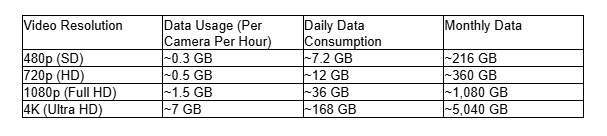
These numbers assume continuous recording for one camera. Using motion detection or reducing frame rate and resolution can significantly reduce data usage.
Do Security Cameras Use WIFI or Mobile Data?
Security cameras use both, depending on the setup:
- Wi-Fi Network (IEEE 802.11): Most residential systems connect to your home Wi-Fi router and rely on it for uploading video or livestreaming.
- 4G Security Camera / 4G Camera: These connect through a cellular data plan, useful for remote areas with no Wi-Fi access. However, cellular data can get expensive quickly due to higher data consumption.
If you’re using a 4G security setup in Texas, be mindful of mobile data charges and overages. A 4G camera can easily use up to 45 GB per month on HD video settings.
How Much Data Does a Security Camera Use Per Second?
Let’s go more granular. A 1080p camera at 30 fps using H.264 compression can consume around:
- 1.5 Mbps – translates to roughly 0.19 MB per second
- This equals 11.4 MB per minute or about 684 MB per hour
If multiplied over several cameras, your daily and monthly totals shoot up quickly.
How to Reduce Data Usage in a Security Camera System
Fortunately, there are smart ways to reduce data usage without compromising security.
Use Motion Detection
Activate motion detection to record only when activity occurs. This avoids unnecessary data usage, especially overnight or when you’re home.
- Set up zones to ignore common movements like trees swaying or traffic.
- Adjust sensitivity to minimize false triggers from pets or shadows.
Adjust Camera Settings
Tweaking your camera system settings can make a big difference:
- Reduce frame rate to 15 fps.
- Lower resolution if ultra-clear quality isn’t a must.
- Turn off audio if not needed, as it adds to data consumption.
Choose the Right Storage Option
Let’s compare options:
Cloud Storage vs Local Storage
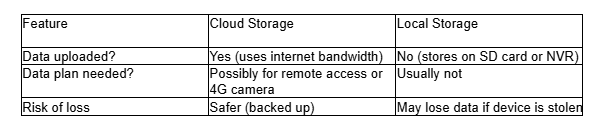
Local storage avoids unnecessary cloud upload activity, helping reduce the camera’s data consumption.
Other Easy Ways to Reduce Data Consumption
- Optimize motion detection: Only upload relevant events to reduce daily data consumption.
- Use compression: Make sure your system supports efficient video compression like H.265.
- Monitor data usage regularly: Many router apps let you track how much data each device uses.
- Limit live stream time: Only live stream feed when necessary to avoid data use.
- Disconnect unused cameras: Reduce the number of cameras operating 24/7.
- Backup selectively: Save key events to the cloud, not every second of video.
How to Know If You’re Exceeding Data Caps
If your service provider enforces data caps, keep an eye on:
- Daily data consumption: Cameras can eat through a 50 or even 100 GB data plan fast.
- Monthly data totals: A couple of 1080p cameras with continuous video can consume over 1 TB monthly.
- Router monitoring tools: These help detect unusual spikes in data.
Home Security Use Cases in Texas
Security cameras are used across many homes and businesses in Texas for various needs:
- Home security: Monitor porches, backyards, and driveways from anywhere.
- Supermarkets & shops: Keep an eye out for shoplifting or suspicious behavior.
- Vacation homes: Especially useful when using a 4G connection in rural areas.
- Small businesses: From restaurants to boutiques, video surveillance is widely adopted.
If you’re choosing a camera system for one of these use cases, think about how much data security cameras use in that specific setting. The number of cameras and the type of footage needed can significantly impact your data use.
Final Thoughts: Optimize Your Security Without Overspending
There’s no one-size-fits-all answer to “how much data does a security camera use” because it depends on your setup. But one thing’s for sure: tracking and minimizing data usage is essential to avoid surprises on your data bill and maintain your security system’s performance.
At True Home Protection, we take pride in helping Texas residents find a residential video monitoring system that fits their needs and budget.
Smart camera use doesn’t mean giving up coverage. Use motion detection, adjust your video quality, and think through your storage choices.
Want more expert tips on securing your Texas home or optimizing your camera’s data consumption? Visit our residential video monitoring system page to learn more. Or, call us today.
