
When it comes to protecting your home in Texas, security cameras are one of the smartest investments you can make. But if you’re like many homeowners, you might be wondering: Should you go with security cameras that store footage locally or ones that use the cloud?
Both options have their strong points, so let’s unpack the real differences between security cameras with local storage vs cloud. That way, you’ll know exactly which setup fits your needs, budget, and comfort level.
What Is Local Storage in Home Security Cameras?
Local storage means the footage your security camera captures is saved right on the device itself or on nearby hardware. This often includes:
- MicroSD cards inserted directly into the camera
- External hard drives connected to a DVR (digital video recorder)
- Network Video Recorders (NVRs) that manage multiple cameras
Pros of Local Storage:
- No monthly fees: Once you buy the device, there’s no ongoing cost.
- Footage stays private: With no external upload, your video isn’t floating around online.
- 24/7 recording, even offline: Local cameras can keep running even if your internet goes out.
Cons of Local Storage:
- Risk of theft or damage: If someone steals or destroys the camera or recorder, you may lose all the footage.
- Storage limitations: Cards and drives fill up, and you might have to overwrite old footage.
- Less remote access: You usually need to be on the same network or use a mobile app, and live viewing might be limited.
How Cloud Storage Works for Security Footage
Cloud-based storage means your security footage is uploaded over the internet and saved in encrypted data centers managed by the camera provider or a third-party cloud service.
Pros of Cloud Storage:
- Off-site security: The footage is safe even if your camera is stolen or damaged.
- Easy remote access: View live and recorded footage from your phone, tablet, or computer.
- Smart integrations: Many systems alert you when motion is detected and allow for automatic archiving or rule-based notifications.
Check out Open Eye Cameras and what they can do for your businesses cloud storage needs.
Cons of Cloud Storage:
- Monthly fees: Expect a subscription plan for storing footage beyond a limited free tier.
- Internet-dependent: Without stable internet, uploads can fail or lag.
- Privacy considerations: Some users worry about who can access cloud-stored footage and how it’s used.
Comparing Security Cameras With Local Storage vs Cloud in Real Scenarios
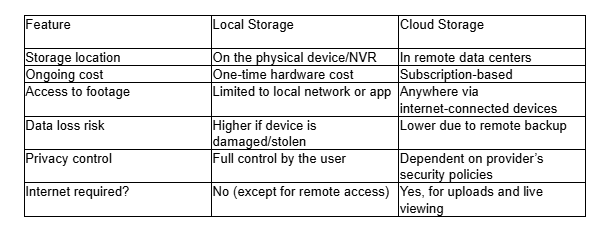
Choosing between the two comes down to your priorities. Below is a quick breakdown:
Which Is More Reliable in Texas Homes?
We’ve worked with hundreds of families across Texas to help design a home video surveillance system that fits their lifestyle. And here’s what we’ve seen:
Local storage is great for rural areas where internet speed is low or inconsistent. It also appeals to privacy-focused folks who prefer not to upload video anywhere.
On the other hand, with modern fiber networks increasingly available in Texas cities, cloud cameras offer unmatched convenience and real-time responsiveness. Automatic alerts, smart detection, and the ability to view your camera feed while away at work make a real difference for busy families.
The Hybrid Option: Why Not Both?
Many newer home video surveillance systems allow a mix of both local and cloud storage. This way, you can keep footage on a local device for quick retrieval and also have cloud backups for extra protection.
Some benefits of hybrid systems include:
- Fail-safes: If cloud upload fails, local recording continues.
- Faster review: You can access local footage quickly while using the cloud for long-term storage.
- Custom settings: You may choose to store only motion-triggered clips on the cloud and leave 24/7 recording on a local drive.
At True Home Protection, we often recommend hybrid systems as a future-proof solution.
Picking the Right Home Video Surveillance System for Your Needs
Before you decide between security cameras with local storage or cloud storage, think about how you’ll use your cameras:
- Do you travel often? Cloud might be a better fit.
- Is privacy your top concern? Local storage gives you full control.
- Are you on a budget? Local saves you from monthly subscription fees.
- Want the best of both? Look into hybrid models.
Final Thoughts: Choosing What Works for Your Home
Security cameras with local storage vs cloud doesn’t have a one-size-fits-all answer. It really depends on what matters most to you: privacy, convenience, cost, or reliability.
If you’re still uncertain, consider starting with a hybrid system that gives you flexibility as your needs evolve. Or, tap into the expertise of professionals who understand the ins and outs of home security in Texas. Reach out Today.
Your peace of mind is worth it.
Want expert help tailoring your home video surveillance system? Check out our video monitoring options designed to keep your home secure 24/7.
